
Software Supply Chain Security
Knowing a vulnerability exists in a dependency is good. Knowing whether the dependency itself is trustworthy is better. TrustSource assesses the supply chain risk of every component — with OpenSSF Scorecards, Viability Scores and proactive EOL detection.


At a Glance
The Challenge
Attackers today don't only target vulnerabilities in known libraries — they attack the supply chain itself. Typosquatting, dependency confusion, compromised maintainer accounts: the SolarWinds attack and the XZ Utils backdoor demonstrated that even trusted open-source projects can serve as an entry point. An SBOM alone is not enough — what matters is how trustworthy each component in the stack actually is.
What are OpenSSF Scorecards?
OpenSSF Scorecards are an open-source project by the Open Source Security Foundation. They assess open-source projects against more than 20 automated checks — from branch protection and code reviews to dependency pinning, vulnerability disclosure and CI best practices. The result is a score between 0 and 10 that shows the security posture of a project at a glance. Scorecards are today the de facto standard for evaluating open-source security practices.
How to use Scorecards with TrustSource
Scorecard information is available for every component in the TrustSource platform — as long as the project is already automatically scanned by the OpenSSF. For repos without an existing entry, a scan can be triggered directly in TrustSource — applicable to any publicly reachable Git repository, including your own projects. This allows you to assess the security posture of your own code just as easily as that of any third-party component.
The TrustSource Supply Chain Security Report
The Supply Chain Security Report provides an overview of all components in a project with their Scorecard values, score distribution and a benchmark against the average of all TrustSource projects. Deviations in the distribution allow a well-founded assessment of relative risk — critical components are explicitly flagged.
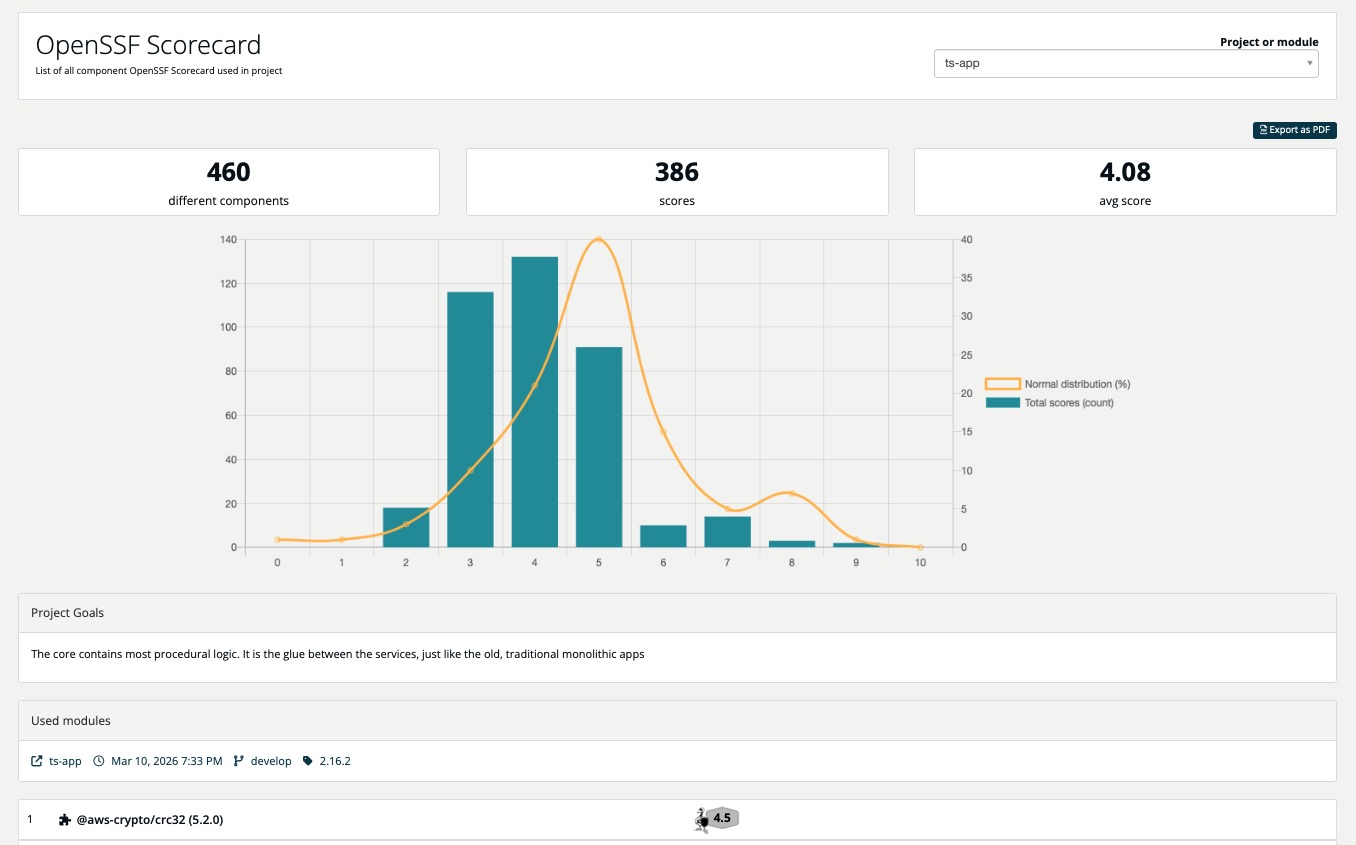
Additional information per component
Viability Score
- How actively is the project being developed?
- How many committers are actively contributing?
- When was the last commit to the repository?
- How many open issues are there?
A low Viability Score signals that a component may no longer be actively maintained — an early warning before end-of-life is officially announced.
Version & EOL Checks
- Jump detection: Identifies unusual version jumps to protect against dependency confusion attacks
- Ageing warnings: Alerts for components that are becoming outdated but have not yet reached EOL
- End-of-life detection: Early warnings for components approaching the end of their support lifecycle